

TL;DR:
- Effective attendance tracking reduces costly absenteeism and administrative errors by providing real-time data. Implementing scalable, tool-specific systems tailored to workforce needs improves accuracy, compliance, and operational insights. Continuous review, clear communication, and organizational buy-in are essential for long-term success of attendance management systems.
Untracked absences and manual timesheets are quietly draining your business. US absenteeism costs $225.8B annually, and that figure only captures the direct financial hit. Factor in the administrative hours spent chasing paper sign-in sheets, correcting payroll errors, and defending compliance decisions without solid records, and the problem compounds fast. This guide gives you a practical, step-by-step approach to building an attendance tracking system that actually works, one that reduces errors, scales with your team, and turns timekeeping data into real operational insight.
Table of Contents
- Why effective attendance tracking matters
- Essential tools and requirements for accurate tracking
- Step-by-step: Setting up your attendance tracking system
- Verification, common pitfalls, and ongoing improvement
- What most guides miss about attendance tracking success
- Seamlessly upgrade your attendance tracking with Zeppri
- Frequently asked questions
Key Takeaways
| Point | Details |
|---|---|
| Absenteeism is costly | Manual attendance leads to significant financial losses but is fixable with digital tools. |
| Tech matters, but process wins | Choosing feature-rich, scalable solutions and clear processes ensures long-term success. |
| Verification prevents errors | Regular audits and data analysis help catch mistakes early and keep teams accountable. |
| Employee buy-in is critical | Success depends as much on acceptance and change management as on technology. |
Why effective attendance tracking matters
With absenteeism costing organizations billions, it's clear why effective tracking should be at the top of your priority list. But the real opportunity isn't just stopping the bleeding. It's building a system that actively improves how your workforce operates day to day.
When employees know their time is tracked accurately and fairly, accountability rises. When managers have real-time visibility, they can make faster staffing decisions. And when payroll connects directly to attendance data, errors that once took hours to untangle disappear. The attendance tracking benefits ripple across your entire organization.
Here's what organizations running outdated systems typically deal with:
- Manual entry errors that corrupt payroll and require expensive corrections
- No audit trail when disputes arise over hours worked or leave taken
- Invisible patterns like chronic late arrivals that managers can't address without data
- Compliance exposure when time records can't stand up to scrutiny
Consider the scale of the problem. The SMB software market reached $1.49 billion in 2026, driven by small and mid-sized businesses finally recognizing that manual tracking is no longer a viable option. Spreadsheets and paper logs can't handle distributed teams, flexible shifts, or the compliance requirements that regulators increasingly enforce.
| Tracking method | Error rate | Time to process payroll | Audit capability |
|---|---|---|---|
| Paper timesheets | High | 3 to 5 hours/week | None |
| Spreadsheets | Medium | 2 to 3 hours/week | Limited |
| Basic digital tools | Low | 1 to 2 hours/week | Partial |
| Integrated platform | Minimal | Under 30 minutes/week | Full |
The jump from manual to integrated digital tracking isn't just about convenience. It's about building the operational foundation that growing organizations actually need.
Essential tools and requirements for accurate tracking
Understanding why attendance tracking matters is one thing. Knowing how to get it right starts with choosing the correct tools and features for your specific workforce.
Your workforce configuration determines what tools you need. A retail team working fixed shifts at a single location has very different requirements from a construction crew spread across three job sites, or a hybrid tech team with employees in three time zones. There's no universal solution, but there are clear categories to evaluate.
Hardware and software options to consider:
- Mobile clock-in apps for teams that don't work at a fixed desk
- Geofencing that automatically triggers clock-in when an employee enters a defined location
- Biometric readers for high-security environments or locations with shared devices
- QR code check-ins as a lightweight option for field teams and events
- Browser-based portals for office workers who start their day at a computer
GPS and geofencing are particularly valuable for hybrid and remote teams, where you can't physically verify location. Field teams often need multi-mode options, combining QR codes, biometric, and mobile, because no single method works in every environment. The payoff is measurable: GPS-enabled systems reduce timekeeping errors by 25% in distributed teams.
| Work arrangement | Recommended tools | Key features needed |
|---|---|---|
| Office based | Browser portal, badge reader | Simple clock-in, break tracking |
| Remote | Mobile app, GPS verification | Location stamp, real-time status |
| Field teams | QR code, biometric, mobile | Multi-mode, offline capability |
| Hybrid | Mobile app, geofencing | Flexible location rules, instant sync |
| Retail/hospitality | Shared kiosk, mobile | Shift-based scheduling, break alerts |
Once you've matched tools to your team type, look closely at mobile app features that managers specifically need. Real-time notifications when someone doesn't clock in, shift coverage alerts, and the ability to approve time-off requests from anywhere are not optional extras. They're the difference between a manager who's always chasing information and one who's actually managing.
Mobile clock-in accuracy also depends on the right configuration. Location verification, photo confirmation, and tamper-resistant timestamps keep your records clean and defensible. Pair that with automated time tracking that feeds directly into payroll, and you've eliminated the single biggest source of payroll errors: manual data transfer.

Pro Tip: Before selecting a platform, confirm it has a direct integration with your payroll provider. Even a great attendance system creates friction if someone has to manually export and import data every pay period. Native payroll integration alone can save your HR team several hours per week.
Step-by-step: Setting up your attendance tracking system
Armed with an understanding of essential tools, you're ready to implement a system that fits your team's unique needs. The setup process matters as much as the technology you choose.
Step 1: Audit your current process. Pull your last three months of timesheets and count how many corrections, disputes, or payroll adjustments occurred. This baseline tells you exactly where your current system is failing and gives you a benchmark to measure improvement against.
Step 2: Define your requirements. List every location, work arrangement, and shift type your organization runs. Note any compliance requirements specific to your state or industry, such as mandatory break tracking or overtime rules. These requirements will drive your platform selection.
Step 3: Select a scalable platform. Scalable tools with mobile and real-time features are essential for future-proofing your system. Avoid platforms built only for your current headcount. If you're at 30 employees now but plan to reach 100, you need a system that handles that growth without a full replacement.
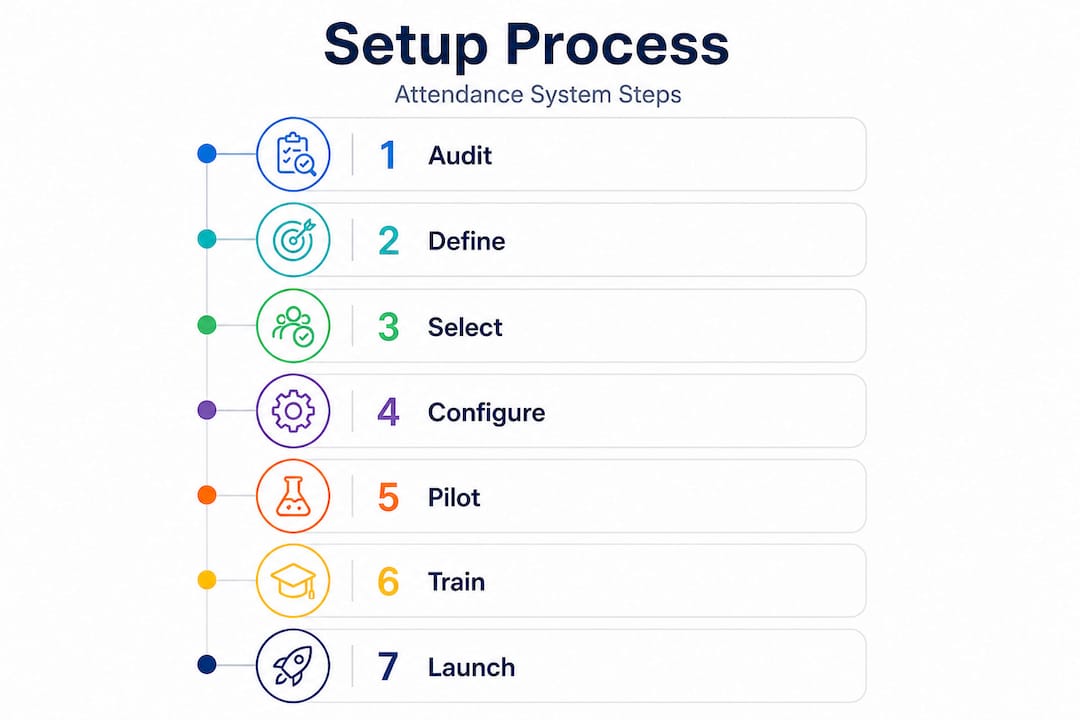
Step 4: Configure your rules. Set up shift schedules, geofence boundaries, overtime thresholds, and leave policies before a single employee touches the system. Getting configuration right upfront prevents a wave of exceptions and corrections during rollout.
Step 5: Run a pilot group. Choose 10 to 15 employees from different roles and locations. Run the system in parallel with your existing method for two weeks. This surfaces issues without disrupting your full operation.
Step 6: Train your managers first. Managers are your system's gatekeepers. If they don't understand how to read dashboards, approve requests, and handle exceptions, the system fails regardless of how good the software is. Invest in hands-on manager training before employee-wide rollout.
Step 7: Launch company-wide with clear communication. Employees need to know why the system is changing, how it works, and what's expected. A clear communication rollout prevents resistance and builds trust in the new process. Follow a structured step-by-step time tracking approach rather than switching everything overnight.
| Rollout phase | Key actions | Success indicators |
|---|---|---|
| Pilot (weeks 1 to 2) | Configure, test with small group | Fewer errors than baseline |
| Training (week 3) | Manager and employee walkthroughs | 90%+ completion of training |
| Live launch (week 4) | Company-wide activation | Clock-in rate above 95% |
| Optimization (month 2) | Review data, adjust rules | Payroll processing time reduced |
For organizations with complex teams across multiple sites, scalable workforce management practices mean building in room for location-specific configurations and role-based access controls from day one.
Pro Tip: Prioritize platforms that send real-time alerts for missed clock-ins. Catching a missed punch in the moment is infinitely easier than reconstructing it at the end of a pay period from memory.
Verification, common pitfalls, and ongoing improvement
Even the best attendance systems require verification and optimization. Setting it up is the start, not the finish line.
The most common mistake organizations make after launching a new system is assuming it will run itself. Data quality degrades when no one is actively reviewing it. Missed punches accumulate. Employees find workarounds. Managers approve timesheets without actually checking them. Before long, you're back to the same problems you had with the old system, just with better-looking software.
Verification checklist to build into your routine:
- Weekly review of any missed punches or unresolved exceptions
- Bi-weekly spot-checks comparing GPS-stamped clock-ins to scheduled shifts
- Monthly manager review of overtime patterns and absence trends
- Quarterly audit of system configuration for compliance changes
- Regular employee pulse checks on ease of use and any friction points
"The organizations that get the most from attendance technology are the ones that treat it as a living system, not a one-time installation."
Common errors that derail otherwise solid systems include incomplete records from employees who forget to clock out, lack of initial training leading to inconsistent use, and managers who override exceptions without documenting reasons. Each of these sounds minor in isolation, but they compound quickly across a team.
GPS and geofencing features reduce location-based errors by 25%, but only if geofence boundaries are correctly configured and regularly reviewed as teams move or job sites change. A geofence set to the wrong address is worse than no geofence at all, because it creates false positives that take time to untangle.
Use real-time analytics to track patterns rather than just individual incidents. If one department shows consistently higher missed punch rates, that's a training issue, not just an employee behavior problem. If overtime is clustering around specific shifts, you have a scheduling problem worth solving before it becomes a budget problem.
Connecting attendance data to leave management also closes a critical gap. When you integrate time and attendance data with your leave records, you see the full picture of workforce availability rather than managing each system in isolation. And strong time-off management practices prevent the kind of last-minute absence surprises that throw a perfectly planned schedule into chaos.
Pro Tip: Schedule a quarterly system review on your calendar right now, before you even finish setup. Treat it like any other compliance deadline. Review your configuration, check for rule changes in your jurisdiction, gather manager feedback, and update accordingly.
What most guides miss about attendance tracking success
After walking through the full technical playbook, here's something most guides skip entirely: technology alone doesn't fix an attendance problem. Organizational habits and employee trust determine whether a system actually works.
We've seen organizations implement genuinely excellent platforms and still struggle with data quality six months later. Not because the software failed. Because the cultural side of the change was ignored. Employees who don't understand why they're being tracked, or who feel surveilled rather than supported, find ways around the system. They clock in for coworkers. They submit manual corrections that managers rubber-stamp. The data looks clean on the surface and is unreliable underneath.
The organizations that get lasting results from real-time tracking for teams do two things differently. First, they communicate the purpose clearly. Attendance tracking isn't about catching people. It's about making sure everyone gets paid correctly, coverage gaps get filled, and the organization stays compliant. When employees understand that framing, adoption goes up and resistance goes down.
Second, they iterate constantly rather than doing one big overhaul every few years. Small, quarterly adjustments based on actual data outperform dramatic system changes every time. Look at what the analytics are telling you, make one or two targeted changes, measure the result, and repeat. This approach keeps the system current without creating the disruption that large-scale changes always bring.
HR leaders who prioritize clarity and communication alongside tool selection consistently outperform those who treat implementation as a purely technical exercise. The best attendance system is one your team actually uses correctly, and that's as much a people challenge as it is a technology challenge.
Seamlessly upgrade your attendance tracking with Zeppri
Ready to put modern attendance tracking to work? The steps in this guide are actionable with any solid platform, but having the right tool makes every stage dramatically easier to execute and maintain.

Zeppri is built specifically for organizations that need accurate, scalable attendance management without the complexity of enterprise-level systems. Mobile clock-ins with GPS verification, geofencing for location-based accountability, automated time-off requests, and real-time manager dashboards come together in a single platform designed for the way modern teams actually work. Payroll-ready reporting exports eliminate manual data transfer, and quick onboarding means your team is up and running in days, not months. Whether you're managing 15 employees across two locations or 300 across multiple sites, Zeppri scales with your operation and keeps your attendance data clean, compliant, and actionable.
Frequently asked questions
How does GPS attendance tracking reduce timekeeping errors?
GPS and geofencing automatically verify employee locations at clock-in, eliminating manual entry guesswork and reducing errors by 25% in distributed teams.
What is the average annual cost of absenteeism for US businesses?
Absenteeism costs US businesses $225.8 billion each year, making it one of the largest controllable workforce expenses for organizations of any size.
Can attendance tracking be automated for remote and hybrid teams?
Yes. Modern platforms use mobile apps and GPS to automate tracking across remote, hybrid, and field arrangements, covering every work arrangement within one unified system.
What are common pitfalls to avoid in attendance tracking?
The biggest issues are incomplete clock-out records, skipping manager training during rollout, and failing to review system data regularly enough to catch patterns before they become persistent problems.