

TL;DR:
- Integrating time and attendance systems with payroll and HR platforms improves accuracy, reduces errors, and delivers substantial cost savings. A structured pilot, real-time API synchronization, and ongoing monitoring are essential for successful implementation. This integration transforms workforce data into strategic insights, enhancing compliance and employee trust.
Most HR managers and business owners assume their current time tracking setup is "good enough." If shifts are being logged and payroll is running on schedule, what's the problem? The problem is hidden cost, compounding errors, and a widening gap between what your data shows and what's actually happening on the floor. Organizations that upgrade from manual or siloed systems to fully integrated time and attendance solutions report results that are hard to ignore. One construction firm saw timesheet accuracy jump from 58% to 95% while saving over $54,000 annually and achieving a 5.1x ROI. This article explains what integration really means, why it matters, and how to do it right.
Table of Contents
- What does integrating time and attendance data mean?
- The tangible benefits of integration
- Common pitfalls: Where integration efforts go wrong
- Implementation best practices for a smooth integration
- Why integration pays off: Our take
- Level up your workforce management with Zeppri
- Frequently asked questions
Key Takeaways
| Point | Details |
|---|---|
| Integrations drive accuracy | Automated time and attendance data dramatically increases payroll precision and reduces costly errors. |
| Major cost savings | Organizations see tangible financial ROI, including tens of thousands in annual savings. |
| Compliance is easier | Integrated systems capture required records, helping your business stay audit-ready effortlessly. |
| Avoid common pitfalls | Proper planning and pilot testing are essential to realizing full integration benefits. |
| Future-ready workforce | Integration enables faster, data-driven decisions and positions your organization for strategic agility. |
What does integrating time and attendance data mean?
Integration, in the context of time and attendance, means your time-keeping system automatically communicates with your payroll software, HR information system (HRIS), and scheduling tools in real time. Data does not sit in isolated spreadsheets or require manual re-entry. Instead, clock-in records flow directly into payroll calculations, leave balances update automatically, and managers see accurate, up-to-the-minute staffing data without chasing reports.
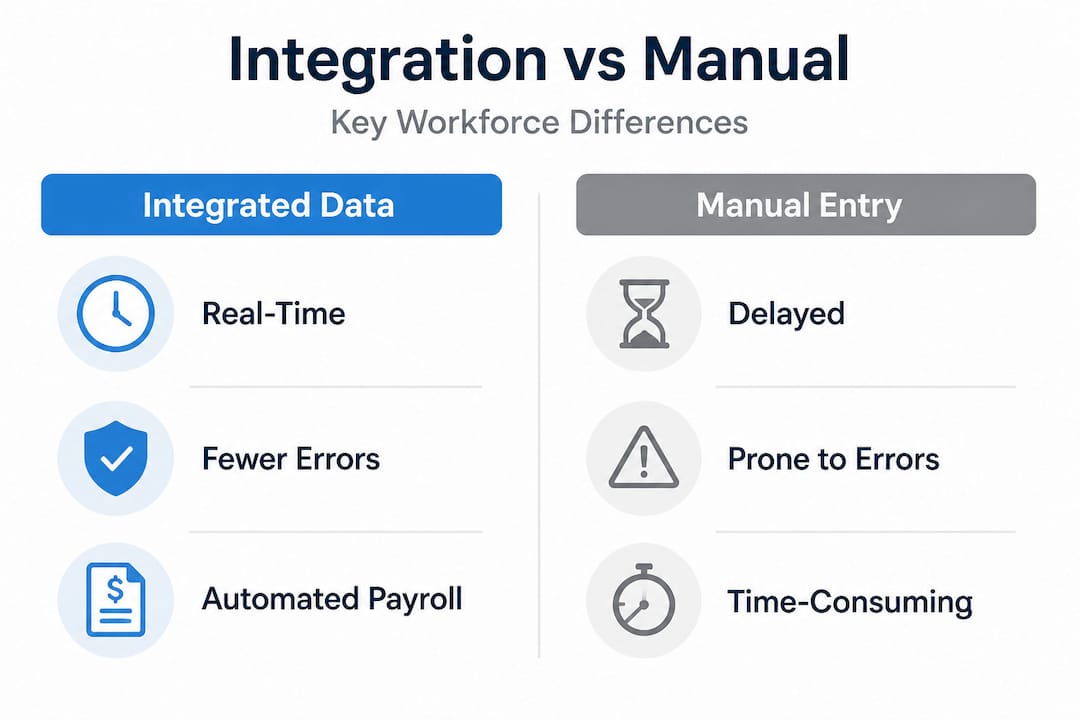
This is fundamentally different from simply going digital. A company can use a digital timeclock app and still have a completely siloed setup if that data must be manually exported to a CSV file and then uploaded into payroll each week. That process is digital, but it is not integrated.
Understanding time tracking basics helps clarify why true integration requires more than just digitizing paper timesheets. When you move from digital timesheet tracking to a fully connected ecosystem, every record update flows through every relevant system simultaneously.
The most common integration methods include:
- API-based real-time sync: The time and attendance platform connects directly to your payroll or HRIS through an application programming interface (API), which is essentially a live data bridge. Changes reflect instantly across systems.
- Pre-built connectors: Many platforms offer ready-made integration packages for popular payroll providers like ADP, Paychex, or Workday. These connectors reduce setup time dramatically and follow best practices for sync including pilot testing before full rollout.
- File export integrations: CSV or flat-file transfers that are scheduled at set intervals. These are slower, more error-prone, and increasingly considered outdated for medium to large organizations.
- Pilot testing phases: Controlled rollouts where one department or location goes live first, validating data accuracy before the full organization transitions.
For medium to large organizations, the API-based approach is the gold standard. It eliminates lag, reduces human touchpoints, and ensures that any correction made in one system propagates to all connected platforms instantly.
The tangible benefits of integration
Once you understand what integration actually involves, the case for doing it becomes compelling fast. The benefits are not theoretical. They show up in your payroll budget, your HR team's workload, and your compliance audit results.
Accuracy and error reduction
Manual data entry and file-based transfers introduce errors at every step. Transcription mistakes, missed punches, and formula errors in spreadsheets pile up over time. The real-world impact of fixing this is significant. A construction company that automated its time tracking and payroll integration saw timesheet accuracy rise from 58% to 95%, eliminating thousands of processing hours and nearly all manual correction work.
That accuracy jump translates directly to fewer payroll disputes, less time spent by HR correcting records, and employees who get paid the right amount on time, every time.
Financial returns
The financial benefits of automation are measurable from the first quarter. That same construction case study documented $54,207 in annual savings and a 5.1x return on investment. The savings came from reduced administrative labor, eliminated overpayments, and fewer compliance penalties.
Here is a snapshot comparison of what organizations typically see before and after integration:
| Metric | Before integration | After integration |
|---|---|---|
| Timesheet accuracy | 58% to 75% | 90% to 97% |
| Payroll processing time | 6 to 10 hours/week | 1 to 2 hours/week |
| Manual correction incidents | High frequency | Near zero |
| Compliance violation risk | Elevated | Significantly reduced |
| Annual admin savings | Baseline | $30,000 to $60,000+ |
"The moment our time data started syncing automatically with payroll, we stopped having Friday afternoon fire drills to fix timesheet errors before the cutoff."
Pro Tip: Calculate your current cost of payroll errors by tracking how many corrections your team makes per pay period and multiplying by the average time spent per correction. That number, once visible, tends to accelerate the business case for integration quickly.
Efficiency for HR and payroll teams
Improving payroll accuracy through integration also frees your HR and payroll staff to work on higher-value tasks. Instead of manually reconciling timesheets against schedules, they can focus on workforce planning, compliance reviews, and employee support.

Compliance and employee experience
Labor law compliance requires accurate, timestamped records. Overtime rules, break requirements, and leave entitlements must be tracked precisely to avoid regulatory penalties. Integration ensures records are captured at source, reducing the risk of gaps. Employees also benefit directly. Self-service access to their own time records, automatic leave balance updates, and on-time pay create a smoother, more transparent experience that supports retention.
Common pitfalls: Where integration efforts go wrong
The benefits are clear, but integration projects have a real failure rate when organizations skip critical steps. Knowing what goes wrong is just as valuable as knowing what to aim for.
-
Skipping the pilot phase. Rushing a full organization launch without testing data flows in a controlled environment is one of the most common mistakes. Errors in mapping fields between systems, such as mismatched employee IDs or pay code discrepancies, only surface under real conditions. A structured pilot catches these before they hit your entire workforce.
-
Sticking with file export methods. Organizations that move from paper to digital but continue using weekly CSV uploads are still carrying significant risk. API-based real-time sync is preferred over file exports because it removes human-triggered data transfers and ensures information is always current. A file export scheduled for Monday morning will already be stale if a shift was adjusted Sunday night.
-
Underestimating employee adoption. Technology only works when people use it correctly. Managers who do not understand how to approve timesheets in the new system, or employees who do not know how to clock in using geofencing, create gaps that defeat the purpose of integration. Training is not optional. It is part of the implementation.
-
Ignoring compliance-specific configuration. Your integration needs to account for overtime thresholds, mandatory break deductions, and jurisdiction-specific labor rules. If these are not configured before go-live, the system may be calculating pay incorrectly in a way that is automated and therefore harder to catch.
-
No post-launch monitoring. Integration is not a set-and-forget project. Data flows can degrade over time when software versions update, employee records change, or pay codes are added. Regular audits of your integration health catch problems before they affect payroll.
"The biggest integration failures we see are not technical. They are organizational. The system was ready. The people were not."
Leverage real-time analytics advantages to monitor your integration health on an ongoing basis. Dashboards that surface anomalies, such as clock-ins without corresponding schedule entries, act as an early warning system that keeps your data clean without manual spot-checks.
Pro Tip: Build a post-launch review at 30, 60, and 90 days into your integration project plan. These reviews should compare expected vs. actual data accuracy rates and document any edge cases that need system adjustment.
Implementation best practices for a smooth integration
Knowing the pitfalls is helpful. Having a concrete implementation plan is better. Here is how to approach integration as a structured project rather than a rushed tech upgrade.
Step 1: Assess your current state
Before selecting any technology, map out every system that currently touches time and attendance data. This includes your timeclock or scheduling tool, payroll software, HRIS, and any manual processes like spreadsheets or email approvals. Document where data is duplicated, where it is re-entered manually, and where errors most frequently occur. That map becomes your integration roadmap.
Review your compliance integration guidance to confirm you understand which labor rules apply to your workforce before configuring any system.
Step 2: Select a vendor with pre-built connectors
Pre-built connectors to your existing payroll or HRIS provider dramatically reduce implementation time. Verify that the API-based sync methodology is supported and not just a file export dressed up in modern language. Ask vendors specifically: "Is this a live API connection or a scheduled file transfer?" The answer matters.
Step 3: Run a structured pilot
Select one department or location that represents a typical cross-section of your workforce. Roll out the full integration there first, and monitor every data point for two to four pay cycles. Use this phase to validate field mappings, confirm overtime calculations are correct, and test edge cases like shift swaps and partial-day leave.
Drawing from pilot testing strategies helps ensure your rollout is systematic rather than reactive. After the pilot, document findings and adjust configuration before expanding to the full organization.
API integration vs. file exports: A direct comparison
| Criteria | API integration | File export |
|---|---|---|
| Data freshness | Real-time | Delayed (hourly, daily, or weekly) |
| Error risk | Low (automated mapping) | Higher (manual triggers and formatting) |
| Compliance reliability | Strong | Moderate |
| Setup complexity | Moderate (initial config) | Low initially |
| Long-term maintenance | Easier | Increases over time |
Step 4: Train all user groups
Training must cover three groups: employees who clock in and manage their own records, managers who approve timesheets and manage schedules, and HR or payroll staff who oversee the system. Each group needs role-specific guidance, not a single generic walkthrough.
Also ensure that streamlined time-off requests are configured within the integration so leave balances stay accurate across both the scheduling and payroll systems from day one.
Step 5: Establish an ongoing review cycle
Integration health degrades if left unmonitored. Schedule quarterly reviews to check for data discrepancies, update pay code mappings when compensation structures change, and reassess compliance configurations when labor laws are updated in your jurisdiction.
Why integration pays off: Our take
Most discussions about time and attendance integration focus on the immediate wins: fewer errors, faster payroll, lower admin cost. Those are real and worth pursuing. But from our perspective, the deeper value is strategic, and it is frequently underestimated.
When your time and attendance data flows cleanly into every connected system in real time, you gain something that siloed organizations simply do not have: actionable workforce intelligence at the moment it matters. You can see at 10 a.m. on a Tuesday that a department is running short-staffed, and act on it before productivity takes a hit. You can spot attendance patterns that signal early-stage disengagement before they become turnover. You can model the cost impact of a policy change before it goes into effect.
The real-time analytics perspective is often where integration's highest return lives. It shifts workforce management from a backward-looking administrative function to a forward-looking strategic one.
There is also a talent dimension that rarely gets discussed. Employees who receive accurate, timely pay and have transparent access to their own time records trust their employer more. That trust is a retention factor. In industries where turnover is expensive, an integrated, employee-friendly time and attendance system is not just an operational upgrade. It is a competitive advantage in a tight labor market.
Organizations that treat integration as a "nice to have" are essentially choosing to compete with one hand tied behind their back. The data, the efficiency, and the compliance protection are all available. Integration is the step that makes them accessible.
Level up your workforce management with Zeppri
If the benefits outlined in this article resonate with your current challenges, you do not need to figure out the integration journey alone.

Zeppri's workforce management solution is built for exactly this kind of transformation. Zeppri connects real-time mobile clock-ins, geofencing verification, automated time-off requests, and shift scheduling into a single platform that syncs cleanly with your payroll and HR systems. Managers get a live dashboard showing who is clocked in, who is late, and where coverage gaps exist. HR teams spend less time correcting records and more time on work that actually moves the organization forward. With quick onboarding, transparent pricing, and pre-built reporting tools designed for compliance, Zeppri gives medium and large organizations everything they need to turn time and attendance data into a genuine operational asset.
Frequently asked questions
What is the main advantage of integrating time and attendance data?
Integration increases accuracy, simplifies compliance, and delivers substantial cost savings through automation. Real-world results show timesheet accuracy rising from 58% to 95% with over $54,000 in annual savings at a 5.1x ROI.
How does integration help with compliance?
By capturing accurate timestamped records and removing manual re-entry steps, integration supports legal and regulatory compliance for payroll and labor laws. API-based real-time sync ensures records are always current and auditable, which is critical when labor regulators review your records.
Is API integration necessary or can file exports suffice?
API integration is preferred for real-time accuracy, automation, and reliability. File exports are slower, dependent on manual triggers, and more vulnerable to formatting errors that corrupt data downstream.
How do I pilot test a new integration solution?
Roll out the integration to a select department or location first, monitor data flows through two to four complete pay cycles, and use feedback to adjust configurations before expanding. Following structured pilot testing catches field mapping errors and edge cases before they affect your entire payroll.