

TL;DR:
- Effective employee status tracking improves productivity when combined with transparency and proper communication.
- Clear policies, employee involvement, and ongoing feedback are crucial for successful implementation.
- Leaders' commitment to transparency and respecting employee privacy drive higher acceptance and engagement.
Most organizations treat employee status tracking as a control mechanism, something managers impose on reluctant workers. That assumption is costing you. When tracking is introduced with clear purpose and honest communication, it shifts from a source of friction into a genuine productivity tool. Research shows that 52% of employees accept monitoring when the reason is explained, compared to just 18% without any explanation. The gap between those numbers is not about technology. It is about leadership, transparency, and getting the rollout right.
Table of Contents
- What does tracking employee status mean?
- Core reasons to track employee status
- Risks and challenges: balancing trust and monitoring
- Best practices for implementing employee status tracking
- What most guides miss: The real driver behind successful employee tracking
- Streamline your workflow with Zeppri
- Frequently asked questions
Key Takeaways
| Point | Details |
|---|---|
| Transparency drives acceptance | Employee acceptance jumps when organizations clearly explain the purpose behind tracking. |
| Boosts workflow and compliance | Status tracking helps managers optimize schedules while ensuring regulatory requirements are met. |
| Policy communication is essential | Defining and sharing policies prevents trust erosion and legal exposure. |
| Practical tools support engagement | Modern workforce management platforms make tracking efficient and help maintain employee trust. |
What does tracking employee status mean?
Employee status tracking refers to the practice of monitoring work states in real time, specifically whether an employee is clocked in, on break, working remotely, out sick, or off shift. It is not surveillance in the traditional sense. The goal is to give managers and HR teams a clear, accurate picture of who is working, when, and from where, so they can make smarter decisions about scheduling, resources, and compliance.
There are several common forms this takes in practice:
- Digital time clocks: Employees clock in and out at a physical terminal, often using a badge or PIN.
- Mobile apps: Workers log their status from a smartphone, often with location verification built in.
- Geofenced clock-ins: The system automatically confirms the employee is at the right location before registering the clock-in.
- Manual logs: Paper-based or spreadsheet systems, still used in some smaller operations.
- Manager dashboards: A real-time view that aggregates all employee statuses in one place.
The intended outcome is not just accountability. A solid manager's guide to time tracking will tell you the real goal is workflow optimization, not catching people out. When handled poorly, status tracking breeds disengagement and resentment. When handled well, it builds a foundation of shared accountability that actually improves morale.
The acceptance gap is real: 52% acceptance with explanation versus 18% without. That data point alone should reshape how any organization introduces a tracking program. Explaining the "why" upfront is not optional. It is the single most important step.
Core reasons to track employee status
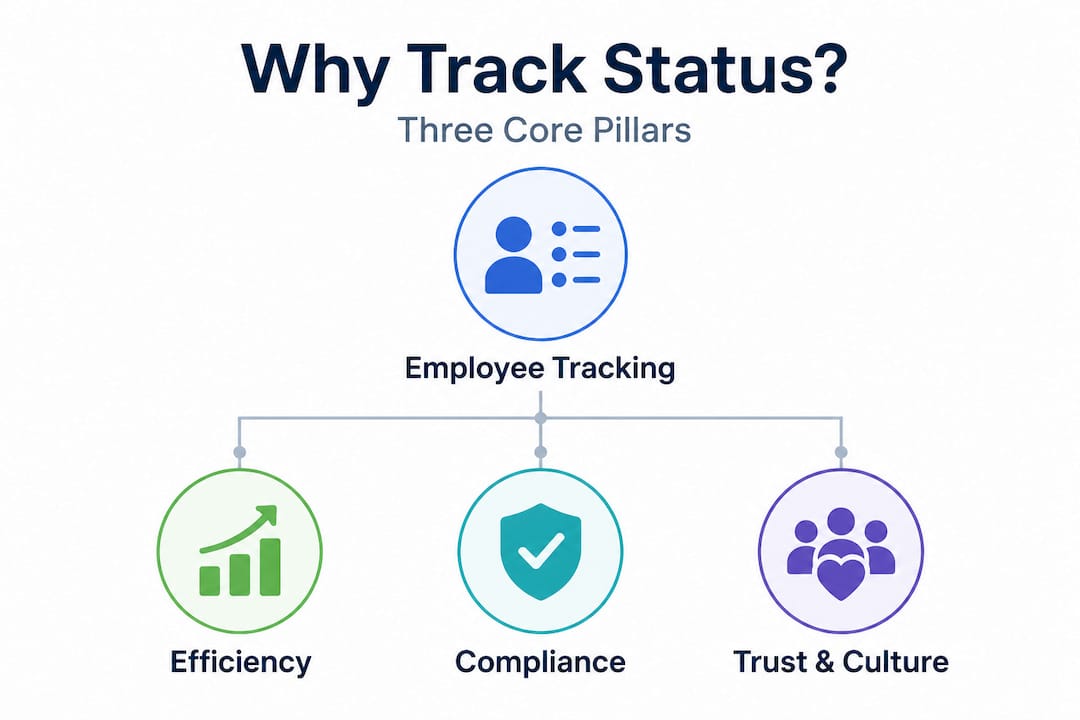
There are three practical pillars that drive organizations to implement status tracking: efficiency, compliance, and better decision-making. Each one has direct operational value, but the benefits compound when all three work together.
Efficiency gains
Scheduling errors are expensive. When managers do not have an accurate, real-time picture of who is present and available, they over-schedule some roles and under-staff others. Status tracking eliminates most of that guesswork. Managers can see gaps as they open up and respond before the shift goes sideways. The automated time tracking benefits extend further: fewer manual corrections, less time spent chasing timesheets, and more accurate payroll data at the end of each period.
Compliance and audit readiness
Labor regulations require documentation. Whether you are subject to overtime rules, mandatory break requirements, or industry-specific labor standards, having a verifiable, timestamped record of employee work states is not just helpful. In many jurisdictions, it is legally required. Status tracking creates an automatic audit trail that satisfies regulators and protects the organization during disputes.
Real-time decision-making
When leadership has live workforce data, operational decisions improve. You can identify patterns, spot attendance problems early, and reallocate resources quickly. Centralized schedule management makes this even more effective by pulling all data into a single view rather than requiring managers to check multiple systems.

Here is how the benefits break down across roles:
| Benefit area | For managers | For HR teams |
|---|---|---|
| Real-time visibility | Spot coverage gaps immediately | Monitor attendance trends across departments |
| Scheduling accuracy | Assign shifts based on actual availability | Reduce overstaffing and labor cost overruns |
| Compliance | Enforce break and overtime rules | Maintain audit-ready records automatically |
| Payroll accuracy | Reduce manual corrections | Export clean data directly to payroll systems |
| Employee communication | Send schedule updates instantly | Manage leave requests from one dashboard |
Follow these steps when introducing status tracking to your team for the first time:
- Define the purpose clearly before you launch. Write it down. Share it with every level of management first.
- Select the right tools for your team structure. A field workforce needs geofencing. A remote team needs mobile clock-in.
- Train managers on how to use the data constructively, not punitively.
- Communicate the rollout to employees with enough lead time for questions and feedback.
- Review the data regularly and share relevant metrics with the teams it affects.
SHRM emphasizes that policy communication is the primary factor in whether workforce monitoring succeeds or creates a culture problem. Organizations that skip this step pay for it later in turnover and disengagement.
Pro Tip: Always state the specific reason for tracking each type of data. "We track clock-ins to verify location compliance" lands very differently than a vague policy that employees have to guess at.
Risks and challenges: balancing trust and monitoring
Even well-intentioned tracking programs can go wrong. The most common failure mode is not a technical one. It is cultural. When employees feel monitored without understanding why, they experience it as distrust. That perception tends to become self-fulfilling: morale drops, productivity declines, and turnover rises.
Here are the key risks organizations face when implementing status tracking without a thoughtful approach:
- Privacy concerns: Employees may feel their personal data is being collected beyond what is necessary for legitimate business purposes.
- Legal exposure: In some regions, monitoring employees without proper disclosure or consent creates genuine legal liability.
- Morale impact: Heavy-handed tracking signals distrust, which research consistently links to lower engagement and higher absenteeism.
- Resistance and workarounds: When employees distrust a system, they find ways around it, which defeats the entire purpose.
- Manager misuse: Without clear guidelines, some managers use tracking data punitively rather than constructively, which accelerates the trust breakdown.
"52% of employees accept monitoring if the reason is explained clearly, compared to only 18% who accept it without any explanation."
That gap is striking and it points directly at the root cause of most failed tracking rollouts. The technology is almost never the issue. The acceptance rate difference is entirely about how well organizations communicate. SHRM also notes that 67% of employees want access to their own monitoring data, and those who receive it report 22 additional satisfaction points on average. That is not a marginal difference. That is a transformative one.
Practical time-off management is also closely linked here. When employees can see their own leave balances, request time off through self-service tools, and track approvals in real time, they feel more in control of their own data. That sense of agency dramatically reduces resistance to the broader monitoring ecosystem.
The solution to most of these risks is not a softer version of tracking. It is a more transparent one. Open communication, employee data access, and consistent policy application are the three factors that convert a skeptical workforce into one that accepts and even appreciates the system.
Best practices for implementing employee status tracking
Getting implementation right is less about finding the perfect platform and more about following a disciplined process. Here are the steps that consistently produce the best outcomes, based on SHRM guidance and the patterns we see across organizations of different sizes.
- Write a clear, specific monitoring policy. The policy should define exactly what is tracked, why it is tracked, who has access to the data, and how long it is retained. Vague policies generate anxiety. Specific ones generate confidence.
- Share the policy before the launch. Do not introduce tracking tools and then follow up with the policy explanation. Employees who learn about monitoring after the fact feel blindsided, and that feeling sticks.
- Give employees access to their own data. This is not just good practice. SHRM recommends it specifically as a trust-building mechanism. When workers can see exactly what is recorded about them, the perceived threat level drops significantly.
- Train managers separately from employees. Managers need to understand how to use the data to coach and improve workflows, not as ammunition for disciplinary action.
- Build in a feedback loop. Schedule regular check-ins or surveys specifically about the tracking program. Use that input to adjust the policy and demonstrate that leadership is listening.
The communication technique you use matters as much as the message itself. Here is how different approaches compare:
| Communication technique | Employee satisfaction impact | Adoption rate |
|---|---|---|
| Written policy only, no discussion | Low | Below 30% |
| Policy plus team meeting | Moderate | Around 50% |
| Policy, meeting, and Q&A session | High | Around 65% |
| Full rollout with employee input phase | Very high | Above 75% |
| Ongoing feedback loop after launch | Highest | Sustained above 80% |
The pattern is clear. Each layer of communication you add increases both satisfaction and adoption. Organizations that invest in a proper rollout process consistently outperform those that treat implementation as a technical exercise.
Workforce compliance strategies should also be part of your policy development process from day one, not retrofitted later. When compliance requirements shape the initial policy design, employees see the tracking as a business necessity rather than a choice made to monitor them personally.
Mobile clock-in tools are worth highlighting here because they add a self-service element that reduces friction. When employees can clock in from their own device and see their own data instantly, the tracking system feels less like something done to them and more like a tool they use themselves.
Pro Tip: Create a short internal FAQ document just for the tracking rollout. Anticipate the five most common employee questions and answer them honestly. Circulate it before the launch date. This single step reduces resistance more than almost anything else.
What most guides miss: The real driver behind successful employee tracking
Most articles on this topic focus on the mechanics: which software to choose, what features to prioritize, how to configure the dashboard. That is useful information, but it misses the fundamental point entirely.
The organizations that succeed with employee status tracking are not the ones with the most sophisticated technology. They are the ones with leaders who genuinely believe in transparency. The platform is almost irrelevant. A mediocre tool rolled out with honesty and respect will outperform an enterprise system launched badly every single time.
We have seen this repeatedly. An organization spends significant budget on a feature-rich workforce management platform, skips the communication planning phase because it feels soft, and then wonders why adoption is stuck at 40% six months later. Meanwhile, a smaller organization with a simpler tool and a thoughtful rollout process hits 80% voluntary adoption within the first quarter. The difference is not the software.
Culture is set at the top, and tracking is a cultural statement. When leadership treats the monitoring conversation as something to get through rather than something to invest in, employees notice. They read it as "they want to watch us but they do not want to explain themselves." That interpretation, once formed, is very difficult to reverse.
The most effective approach we have seen is to involve employees in building the policy, not just informing them about it. When team members contribute input to what gets tracked and why, they develop a sense of ownership over the system. Adoption goes up. Resentment goes down. The data becomes more accurate because employees are not trying to game it. Mobile workforce engagement research consistently supports this: when workers feel heard and respected, they engage with digital tools at significantly higher rates.
The uncomfortable truth is that most tracking failures are leadership failures dressed up as technology problems.
Streamline your workflow with Zeppri
If this article has reinforced one thing, it is that the tools you use need to support transparency, not undermine it. Getting employee status tracking right requires a platform that employees can actually engage with, not just one that managers watch from a distance.

Zeppri's workforce management platform is built around exactly that principle. Real-time mobile clock-ins, geofencing for location verification, automated time-off requests, and an intuitive manager dashboard all work together in one system. Employees see their own data. Managers get clean, exportable reports. HR teams maintain audit-ready compliance records without extra manual work. Whether you are running a retail floor, a healthcare facility, or a distributed field team, Zeppri gives you the infrastructure to implement ethical, efficient workforce tracking that your team will actually accept. Start a demo and see how straightforward it can be.
Frequently asked questions
How does employee status tracking improve workflow efficiency?
Real-time status updates allow managers to identify coverage gaps and reassign resources immediately, while automated time tracking reduces manual errors in scheduling and payroll processing.
What are the risks of employee status tracking?
The primary risks are trust erosion, privacy concerns, and reduced morale, all of which increase when organizations fail to communicate policy clearly before launching a monitoring program.
How can organizations increase employee acceptance of tracking?
Explaining the specific reason for monitoring is the single most effective lever, with acceptance rising to 52% when purpose is communicated versus just 18% when it is not.
What are the best practices for implementing employee status tracking?
Write a specific policy before launch, share it with employees in advance, provide access to individual data, and build in a formal feedback loop so the program can be adjusted based on real employee input.