

TL;DR:
- Effective workforce scheduling aligns qualified staff with demand, reducing costs and improving service quality.
- Successful implementation depends on reliable data, proper technology, organizational buy-in, and incremental change.
Scheduling staff sounds simple until you're staring at a coverage gap on a Saturday night, fielding a compliance notice, and watching your best people leave for competitors with more predictable hours. The pressure is real. Operations managers in retail, hospitality, and healthcare carry the weight of keeping labor costs in line while also keeping employees engaged and regulators satisfied. The good news: workforce optimization benchmarks show organizations that move from static to demand-driven scheduling save 8-15% in labor costs, reduce overtime by 30%, and cut scheduling time in half. This guide breaks down exactly how to get there.
Table of Contents
- What makes workforce scheduling effective?
- Key requirements for successful scheduling
- Step-by-step: How to optimize your scheduling process
- Common mistakes and troubleshooting tips
- Measuring and verifying results
- Why most workforce scheduling projects fail (and how to actually win)
- Simplify scheduling with the right solution
- Frequently asked questions
Key Takeaways
| Point | Details |
|---|---|
| Manual scheduling wastes resources | Manual methods result in up to 30% overspend and higher turnover. |
| Optimization produces rapid results | Modern solutions can cut scheduling time in half and reduce costs 15-30%. |
| Compliance is critical | Tracking credentials and following regulations is essential, especially in healthcare. |
| Successful adoption needs buy-in | Engage staff and management to overcome resistance and ensure scheduling improvements stick. |
What makes workforce scheduling effective?
Effective workforce scheduling is not just about filling shifts. It means aligning the right number of qualified people with forecasted demand, at the right time, while staying within budget and meeting all legal or regulatory requirements. When those three elements come together, the results show up in your numbers: lower labor spend, better retention, and measurable service quality improvements.
Modern workforce management treats scheduling as a strategic function, not an administrative chore. The contrast with traditional, spreadsheet-based approaches is stark. Manual scheduling methods produce 15-30% overspend and contribute to high turnover, whereas optimized, data-driven approaches generate measurable cost savings alongside service improvements. The caveat: over 56% of organizations attempting the shift report resistance from employees or managers, which is itself a major implementation challenge worth planning for.
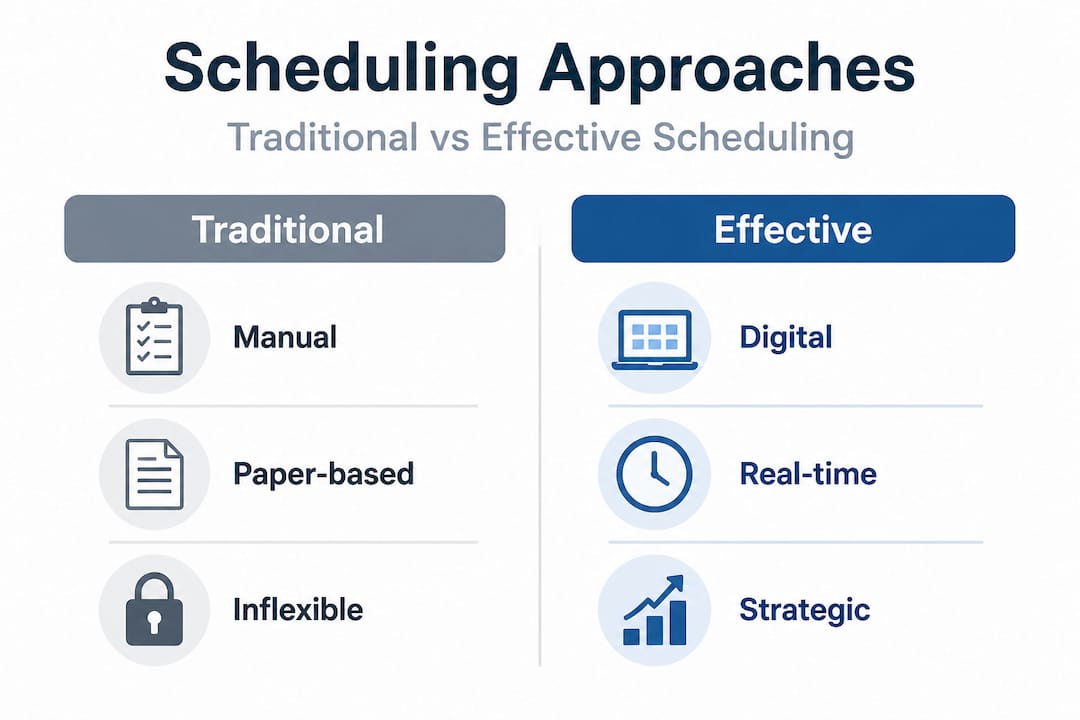
Here's a quick look at the performance gap between manual and optimized scheduling:
| Metric | Manual scheduling | Optimized scheduling |
|---|---|---|
| Labor overspend | 15-30% above target | Near target |
| Schedule build time | 4-8 hours per week | 1-2 hours per week |
| Overtime frequency | High | 30% lower |
| Employee turnover impact | High | 12-18% reduction |
| Compliance error risk | Moderate to high | Low |
Common pitfalls of manual methods include:
- Over-scheduling during slow periods, driven by habit rather than data
- Under-staffing during peak demand, leading to service failures and customer complaints
- Last-minute scrambles when call-outs aren't covered by a clear backup system
- Compliance errors such as missed rest period requirements or unverified credentials
- Low employee engagement, because unpredictable schedules reduce trust and satisfaction
Pro Tip: Track your scheduling error rate for one month before making any changes. Knowing exactly where hours are wasted or compliance is at risk gives you a baseline to measure improvement against later.
Strong employee engagement is both a cause and a result of effective scheduling. When employees get consistent, fair, and predictable schedules, absenteeism drops and discretionary effort rises.
Key requirements for successful scheduling
Before you can optimize, you need the right inputs in place. Jumping into a new scheduling system without the underlying data and organizational readiness is one of the most common reasons projects stall or fail.
The four core requirements are:
- Reliable demand forecasts. This means historical sales or patient volume data, seasonal patterns, and event calendars. Without these, any schedule is just an educated guess.
- Up-to-date employee data. Skills, certifications, availability, and contracted hours all need to be current and accessible. Outdated records lead to compliance failures.
- The right technology. Cloud-based scheduling platforms offer real-time updates, mobile access, and built-in compliance alerts that on-premises systems often lack.
- Organizational buy-in. Managers and employees need to understand why the change is happening, what it means for them, and how to use the new tools.
Here's a side-by-side comparison of cloud-based versus on-premises scheduling tools for mid-sized organizations:
| Feature | Cloud-based platform | On-premises system |
|---|---|---|
| Real-time updates | Yes | Limited |
| Mobile employee access | Yes | Rarely |
| Automatic compliance alerts | Yes | Manual |
| Integration with payroll | Often built-in | Requires custom dev |
| Setup and onboarding speed | Days to weeks | Weeks to months |
| Scalability | High | Low to medium |
Compliance tracking deserves special attention depending on your industry. Scheduling compliance strategies vary significantly between healthcare, retail, and hospitality. In healthcare particularly, the stakes are highest. Research published in Nature Scientific Reports shows that healthcare scheduling prioritizes credentials and regulatory compliance above cost reduction, and that advanced algorithmic approaches improve scheduling quality by 66% over manual methods. Getting a nurse's certification status wrong isn't just a scheduling problem; it's a patient safety issue.
Centralized schedule management also reduces inconsistency across locations, which is critical for retail and hospitality brands with multiple sites. When each location manages its own schedules in isolation, labor is wasted, policies are applied unevenly, and compliance visibility disappears.
Step-by-step: How to optimize your scheduling process
Now that you know what effective scheduling looks like and what you need to get there, here's how to execute it systematically.
-
Analyze historical data and demand patterns. Pull at least 12 months of transaction, volume, or patient data. Look for weekly, monthly, and seasonal peaks. Map these against your current staffing levels to identify where you're regularly over or under-resourced.
-
Define your scheduling policies. Document rest period rules, maximum shift lengths, required certifications per role, and any union or contract obligations. This becomes the rule set your scheduling solution enforces automatically. Refer to shift scheduling steps for a detailed breakdown of this phase.
-
Choose and configure a scheduling solution. Select a platform that fits your industry's compliance requirements and integrates with your existing payroll system. Configure the tool to reflect your policies before inviting any managers or staff to use it. Reviewing top scheduling systems can help you compare features across leading platforms.
-
Train managers first, then staff. Manager confidence is the key to employee adoption. Run focused training sessions, create quick reference guides, and set up a clear support channel for the first 30 days. Managers who struggle publicly will undermine trust in the new system fast.
-
Monitor results and adjust continuously. Schedule a weekly review for the first three months. Look at actual versus forecasted hours, overtime usage, and any compliance flags. Use staff feedback to catch friction points early. Solid time-off management practices during this phase are especially important, as leave requests often create the first real test of a new system.
Statistic to keep in mind: Organizations that move to optimized, demand-driven scheduling cut labor costs by 8-15% and reduce the time spent building schedules by 50%. For a mid-sized operation spending 6 hours a week on scheduling, that's roughly 150 hours saved per year.
Pro Tip: Don't try to automate everything at once. Start with your highest-volume or most compliance-sensitive department, get that right, then expand. A phased rollout beats a failed full deployment every time.
Common mistakes and troubleshooting tips
Even with a solid plan, specific mistakes trip up many scheduling projects. Knowing them in advance lets you build in safeguards before problems hit.
The most common mistakes include:
- Ignoring compliance until it's too late. Missing one rest period requirement or scheduling an uncertified employee can result in fines or serious safety incidents. Compliance should be automated and verified at the schedule-building stage, not audited after the fact.
- Failing to communicate schedule changes promptly. Employees who find out about shift changes at the last minute lose trust quickly. Set a policy for minimum advance notice, and use push notifications through your scheduling app to make sure everyone sees updates immediately.
- No backup coverage plan. Every schedule needs a clear process for covering unexpected absences. Relying on manager calls and texts creates stress and delays. A designated on-call list or shift-swap function within your platform solves this systematically.
- Underestimating resistance. Management and employee resistance affects over 56% of scheduling optimization initiatives. It's not just a technology problem; it's a change management problem. Treating it that way from day one is critical.
- Not auditing the first few schedules manually. Even good tools have configuration errors in early use. A manual spot check of the first two to three schedule cycles catches mistakes before they become habits.
"The most dangerous assumption in any scheduling project is that deploying the technology is the hard part. Getting people to trust it and use it consistently is where most implementations actually succeed or fail."
The benefits of automated time tracking extend well beyond payroll accuracy. Real-time clock-in data feeds directly back into your demand forecasting, making every future schedule more accurate than the last. This feedback loop is what separates organizations that sustain gains from those that plateau after a few months.
Pro Tip: Create a small internal pilot group of early adopters, including a mix of managers and frontline staff, before your full rollout. Their feedback shapes training, and their visible confidence in the system reduces skepticism among their peers.
Measuring and verifying results
Once your new scheduling process is live, your job shifts from implementation to verification. Tracking the right metrics tells you whether the changes are working and where to keep improving.
Here are the key performance indicators (KPIs) that matter most for scheduling effectiveness:
| KPI | What it measures | Target benchmark |
|---|---|---|
| Overtime as a % of total hours | Labor cost efficiency | Reduce by 30% |
| Schedule-to-actual hours variance | Forecast accuracy | Within 5% |
| Employee turnover rate | Retention impact | 12-18% reduction |
| Customer satisfaction score | Service quality | Improvement tied to coverage |
| Scheduling build time | Administrative efficiency | 50% reduction |
| Compliance incidents | Risk management | Zero violations |
To interpret your post-change data accurately, compare against your own pre-implementation baseline first, then benchmark against industry data. The documented benchmarks are clear: a well-executed optimization project should deliver 15-30% overspend reduction, 12-18% lower turnover, and a 30% drop in overtime within 6-12 months of full implementation. One major retail chain achieved an 18% total savings figure, equivalent to $47 million annually, after completing a full demand-driven scheduling rollout.
Useful practices for ongoing measurement:
- Run a monthly scheduling review, comparing planned versus actual hours across all departments
- Survey staff quarterly on schedule predictability and fairness, two leading indicators of retention
- Track compliance incident rates and review any flags in your platform's audit log
- Compare customer satisfaction or service scores to scheduling coverage data to find direct links
For hospitality operations specifically, scheduling accuracy has a direct and measurable impact on guest experience. Hospitality workforce management data consistently links understaffing at peak periods to lower review scores and repeat visit rates. Your scheduling data and your customer feedback are telling the same story from different angles.
Why most workforce scheduling projects fail (and how to actually win)
Here's the uncomfortable truth most implementation guides skip: the technology almost never fails. People do.
We've seen organizations deploy well-designed scheduling platforms, invest in training, and still see minimal adoption six months later. The system runs in parallel with the old spreadsheet for a year because nobody committed to making the switch complete. That pattern is not a technology failure. It's a leadership and communication failure.
Employee and management resistance affects more than half of all scheduling optimization efforts. What drives it? Fear of losing control. Skepticism that algorithms understand the nuances of their team. Distrust of data they didn't generate. These are human concerns, not technical ones, and they require human responses.
The organizations that actually win do three things differently. First, they link scheduling improvements directly to staff well-being from the start of the conversation, not just cost savings. When employees hear "this will give you more predictable hours and a fairer shot at preferred shifts," they listen differently than when they hear "this will reduce labor costs." Both things are true. Lead with the one that matters to them.
Second, they build continuous feedback loops into the process. Monthly check-ins, easy channels for reporting scheduling problems, and visible responses to feedback signal that the system is working for employees, not just against them. Connecting this to your broader engagement strategies makes it sustainable.
Third, they roll out incrementally. Starting with one department, proving it works, letting word spread naturally, and then expanding is slower than a company-wide launch. It is also far more likely to succeed. Credibility travels fast inside organizations. One success story from your busiest department is worth more than any training video.
The mindset shift that matters most: treat scheduling optimization as a behavior change project that happens to involve technology, not a technology project that requires some behavior change. That framing changes how you plan, communicate, and measure success.
Simplify scheduling with the right solution
Managing schedules across multiple teams, locations, and compliance requirements is genuinely complex. But the right platform turns that complexity into a set of clear, manageable tasks your managers can handle in a fraction of the time.

Zeppri is built for exactly this kind of work. As a modern workforce management solution, it brings together shift planning, real-time clock-ins via mobile, geofencing, automated time-off requests, and compliance-ready reporting in one unified platform. Whether you're running a 50-person retail team, a multi-site hospitality operation, or a healthcare facility with strict credentialing requirements, Zeppri gives you the tools to schedule smarter, track accurately, and verify results with confidence. The onboarding is fast, the pricing is transparent, and the impact shows up quickly. See how it works for your organization at zeppri.com.
Frequently asked questions
How much can optimized workforce scheduling reduce labor costs?
Optimized scheduling consistently delivers 15-30% overspend reduction compared to manual, static approaches, with some large-scale retail implementations saving 18% of total labor spend.
Why do workforce scheduling initiatives often face resistance?
More than 56% of optimization efforts encounter resistance because employees and managers fear losing control, distrust algorithmic decisions, or lack confidence with new tools. Addressing this through clear communication and phased rollout significantly improves adoption rates.
What's the main compliance concern in healthcare scheduling?
Healthcare organizations must verify staff credentials and meet regulatory staffing ratios, and research shows healthcare compliance takes priority over cost savings. Advanced scheduling methods improve outcomes by 66% compared to manual approaches.
How quickly can scheduling efficiency be improved?
Most organizations see measurable gains within the first few months of implementation, including a 50% reduction in scheduling time. Full financial benefits such as overtime reduction and turnover improvements typically stabilize within 6-12 months.
What are the best metrics for tracking scheduling effectiveness?
The most reliable indicators are overtime spend as a percentage of total hours, schedule-to-actual hours variance, employee turnover rate, compliance incident count, and customer satisfaction scores tied to coverage periods.