

TL;DR:
- Effective shift scheduling requires understanding staffing needs, skills, peak times, and legal regulations.
- Choosing suitable tools, from spreadsheets to dedicated software, enhances accuracy and compliance.
- Building transparent, fair schedules and fostering communication improves staff morale and reduces turnover.
Last-minute call-outs, overlapping shift requests, and employees stretched thin across back-to-back weeks — poor shift scheduling quietly drains productivity and morale before you even notice the pattern. For HR managers and team leaders, the cost is real: coverage gaps, compliance risks, and frustrated staff who start looking elsewhere. This guide walks you through a practical, step-by-step approach to building a shift schedule that actually works. Whether you're managing a retail floor, a healthcare unit, or a manufacturing line, the same core principles apply. You'll learn how to assess your needs, pick the right tools, build a fair schedule, and keep improving it over time.
Table of Contents
- Assess staffing needs and shift requirements
- Choose your scheduling method and tools
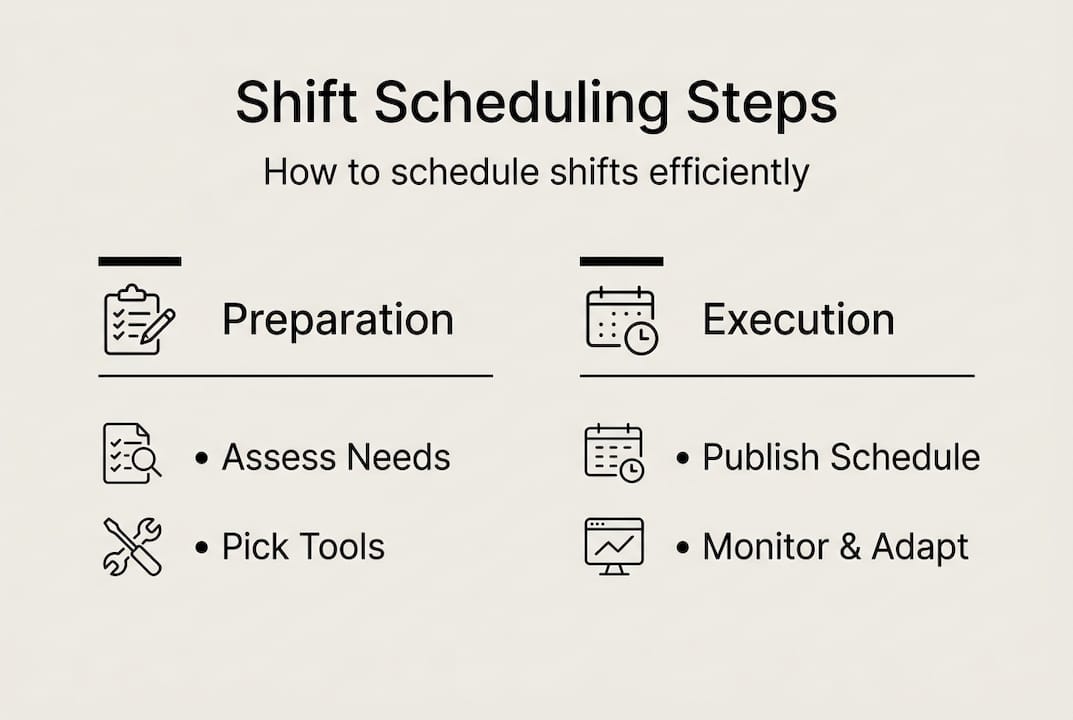
- Build and publish your shift schedule
- Monitor, adapt, and optimize your scheduling process
- What most shift-scheduling advice leaves out
- Streamline your scheduling with Zeppri
- Frequently asked questions
Key Takeaways
| Point | Details |
|---|---|
| Clarify shift needs | Assess team requirements, compliance, and workload patterns before scheduling. |
| Leverage useful tools | Select scheduling software that automates tasks and manages exceptions efficiently. |
| Prioritize fairness | Rotate shifts and track equity to keep teams satisfied and minimize burnout. |
| Review and improve | Continuously monitor scheduling metrics and adapt using staff feedback and data insights. |
Assess staffing needs and shift requirements
Before you open a spreadsheet or log into any software, you need a clear picture of what your operation actually requires. Guessing at coverage is how gaps happen. Start by gathering the right data.
Here's what to collect before you schedule a single shift:
- Staff availability: Collect updated availability forms at least monthly. People's lives change, and outdated availability is one of the top causes of last-minute conflicts.
- Skill sets and certifications: Not every employee can fill every role. Map who is qualified for what, especially in healthcare or food service where credentials matter.
- Business peak times: Pull your sales data, foot traffic logs, or production records to identify when demand spikes. These are non-negotiable coverage windows.
- Legal requirements: Know your local labor laws. Minimum rest periods between shifts, maximum weekly hours, and mandatory break rules vary by state and industry.
Next, decide which shift types fit your operation. Fixed shifts keep the same employees on the same hours every week, which is predictable but inflexible. Rotating shifts cycle employees through different time slots, distributing the burden of nights and weekends more fairly. Split shifts divide a single workday into two separate blocks, useful in hospitality during lunch and dinner rushes. On-call shifts keep staff available without a guaranteed schedule, which works for surge coverage but can frustrate employees.
Here's a simple way to map your weekly requirements:
| Day | Morning (6am–2pm) | Afternoon (2pm–10pm) | Night (10pm–6am) | Skill required |
|---|---|---|---|---|
| Monday | 4 staff | 3 staff | 2 staff | General + 1 certified |
| Friday | 5 staff | 5 staff | 3 staff | General + 2 certified |
| Sunday | 3 staff | 3 staff | 2 staff | General |
Compliance considerations you can't skip:
- Overtime rules (federal and state thresholds)
- Mandatory rest periods between consecutive shifts
- Minor labor restrictions if you employ anyone under 18
- Industry-specific regulations (healthcare, transportation, food safety)
Research on shift scheduling optimization confirms that tracking equity via hours and shift-type metrics quarterly, while using forward clockwise rotations, measurably reduces employee fatigue over time.
Pro Tip: Run a quarterly audit of who received which shift types. If the same people keep drawing nights and weekends, resentment builds fast. Balanced distribution isn't just fair — it protects retention.
Choose your scheduling method and tools
Once you've assessed your needs, the next step is selecting the most effective scheduling method and the right tools. The method you choose should match your team's size, your operation's complexity, and how much flexibility your employees expect.

Here's how the main options compare:
| Method | Best for | Pros | Cons |
|---|---|---|---|
| Paper or whiteboard | Teams under 10 | Zero cost, easy to see | Hard to update, no audit trail |
| Spreadsheet (Excel/Google Sheets) | Small to mid teams | Familiar, customizable | Manual errors, no real-time updates |
| Dedicated scheduling software | Any size team | Automated, trackable, integrates PTO | Learning curve, subscription cost |
To evaluate which approach fits your workplace, work through these steps:
- Count your active employees. Teams above 20 people almost always benefit from software over spreadsheets.
- Map your rotation complexity. If you run multiple shift types across multiple locations, manual methods create too much room for error.
- Identify compliance exposure. The more regulated your industry, the more you need automated tracking to document hours and breaks.
- Check integration needs. Does your scheduling tool need to talk to payroll? Time tracking? Leave management? Confirm compatibility before committing.
- Ask your team. Employee adoption matters. A tool they won't use is a tool that won't work.
The case for scheduling software is strong. AI-driven scheduling tools ensure balance even when exceptions like PTO requests and shift swaps create gaps, reducing the manual back-and-forth that eats up manager time.
The right workforce management tools also give employees visibility into their own schedules, which cuts down on "when do I work?" messages and builds accountability.
Pro Tip: Prioritize platforms that let employees submit PTO requests and propose shift swaps directly in the system. When those workflows are automated, managers spend less time playing referee and more time on actual management.
Build and publish your shift schedule
With your tools selected, you're ready to start crafting and communicating the schedule itself. This is where planning meets execution, and the details matter.
Follow these steps to draft a solid schedule:
- Start with fixed requirements. Block out your non-negotiable coverage windows first: peak hours, mandatory minimums, and any certified role requirements.
- Assign based on availability and skills. Match employees to shifts they're qualified for and available during. Don't override availability without a direct conversation.
- Balance the load. Spread desirable and less desirable shifts equitably. No one should work five consecutive closing shifts while a colleague takes all mornings.
- Build in breaks. Confirm that every shift includes legally required breaks and that back-to-back shifts leave adequate rest time between them.
- Double-check for conflicts. Look for double-bookings, overtime triggers, and employees scheduled during approved leave.
- Get a second set of eyes. Have a supervisor or team lead review the draft before it goes live.
Format options for publishing your schedule:
- Digital scheduling apps: Employees get instant notifications and can view schedules on their phones.
- Shared online documents: Google Sheets or similar tools work for smaller teams comfortable with shared links.
- Printed schedules: Still useful in environments where staff don't use smartphones on the floor, but always pair with a digital backup.
- Bulletin boards: Fine as a supplement, never as the primary method.
"Employees who receive their schedules at least two weeks in advance report higher job satisfaction and lower absenteeism. Transparency in scheduling is not a courtesy — it's a retention strategy."
Research on clockwise shift rotations shows that forward-rotating schedules align better with human circadian rhythms, reducing fatigue compared to backward rotations. When you're building rotating schedules, always move employees from day to evening to night, not the reverse.
For last-minute changes, establish a clear protocol before you need it. Who approves swaps? How much notice is required? Answering these questions in advance prevents chaos when someone calls out on a Friday night.
Monitor, adapt, and optimize your scheduling process
After publishing your schedule, ongoing review and adjustment ensure it stays effective and fair. A schedule that worked in January may not work in July when demand patterns shift and staff turnover changes your roster.
Track these metrics consistently:
- Shift coverage rate: Are all required positions filled for every shift, every week?
- Overtime hours: Is overtime concentrated in specific employees or departments?
- Absenteeism rate: Are certain shifts or days seeing disproportionate call-outs?
- Employee satisfaction scores: Regular pulse surveys reveal scheduling pain points before they become resignation letters.
- Swap and change request volume: A spike in swap requests often signals that the schedule isn't working for your team's real lives.
Collecting feedback doesn't have to be formal. A brief monthly check-in with team leads, combined with a simple digital survey for frontline staff, gives you enough signal to act on. Ask specifically about shift timing, rotation fairness, and advance notice.
Scheduling software reports are your best friend here. Most platforms let you pull overtime summaries, coverage gap reports, and individual hour totals in minutes. Use those reports to spot trends before they become problems. Quarterly metric reviews for fairness and productivity are a proven way to keep scheduling aligned with both business needs and employee wellbeing.
Pro Tip: Rotate shift patterns every quarter, not just when someone complains. Proactive rotation prevents the slow buildup of resentment that comes from one group always drawing the hardest shifts.
For common troubleshooting:
- Swap conflicts: Require manager approval for all swaps and confirm the replacement meets skill requirements before the change is finalized.
- Last-minute call-outs: Keep a short list of on-call volunteers who've agreed to be contacted for extra hours. Incentivize it with a small premium.
- Burnout signals: If an employee's overtime hours spike two weeks in a row, intervene before it becomes a health or performance issue.
What most shift-scheduling advice leaves out
Most guides focus on process: gather data, pick a tool, publish the schedule, track the metrics. That's all necessary. But the organizations with the lowest turnover and the fewest scheduling headaches aren't just running better processes. They've built a culture where scheduling is treated as a shared responsibility, not a top-down directive.
Here's the uncomfortable truth: software can automate conflict detection, but it cannot replace the conversation where a manager notices that an employee has been quietly absorbing the worst shifts for three months and actually does something about it. No algorithm flags that. A manager paying attention does.
Transparency matters more than most leaders realize. When employees understand why the schedule looks the way it does — why coverage requirements force certain patterns, why a request was denied — they're far more likely to accept it without resentment. Small gestures of flexibility, like honoring one personal scheduling preference per employee per month, build more goodwill than any scheduling software feature ever will.
The real competitive advantage in workforce scheduling isn't the tool. It's the trust.
Streamline your scheduling with Zeppri
If building and managing shift schedules still feels like it's eating too much of your week, it may be time to look at what the right platform can do for your team.

Zeppri workforce management brings together shift planning, real-time clock-ins, automated PTO requests, and detailed reporting in one place. You can publish schedules that employees access instantly on their phones, track coverage in real time, and pull payroll-ready reports without chasing down timesheets. Geofencing ensures clock-ins happen where they're supposed to, and the manager dashboard gives you a live view of who's in, who's late, and what's coming up. Whether your team has 15 people or 500, Zeppri scales with you. Explore a demo and see how much time you can get back.
Frequently asked questions
What's the best way to schedule rotating shifts?
Use forward (clockwise) rotations moving from day to evening to night, and track equity quarterly to reduce fatigue and ensure fairness among all employees.
Which metrics should HR managers track for effective scheduling?
Monitor absenteeism, overtime, shift equity, and coverage gaps; reviewing these quarterly helps you optimize both fairness and operational performance.
How can scheduling software reduce staff scheduling errors?
Scheduling software automates conflict detection, ensures compliance, and handles PTO and swap requests with far fewer manual mistakes than spreadsheets or paper systems.
How far in advance should shift schedules be published?
Publish schedules at least two weeks in advance to give staff adequate time to plan and to significantly reduce last-minute conflicts and call-outs.